
Zoho CRM Reviews: What Real Users Say About Features and Value
Last updated September 27, 2026
Zoho CRM is a customer relationship management platform from Zoho Corporation that helps businesses track leads, manage contacts, and automate sales processes. Users generally appreciate its free edition and affordability, but many report setup complexity and customer service frustrations. The platform works well for basic CRM tasks but requires add-ons or integrations for comprehensive marketing and AI capabilities.
Table of contents
- Key takeaways
- What CRM Software Reviews Actually Tell You
- Is Zoho CRM Good?
- Zoho CRM Features Deep Dive
- Zoho CRM Pricing and Plans
- What Do Users Say About Zoho CRM?
- Zoho CRM vs. All-in-One Platforms: A Direct Comparison
- When Zoho CRM Falls Short: Limits and Risks
- How to Start Your CRM Journey in 2026
- Why Businesses Are Choosing All-in-One CRM and AI in 2026
- Frequently asked questions
Key takeaways
- Zoho CRM offers a permanent free edition for up to three users and paid plans starting at $14/user/month.
- Users rate ease of use at 4.2 out of 5 on Capterra, with configuration often requiring outside help.
- Lead management and contact organization are strong, but advanced AI features and marketing tools require higher-tier plans or separate Zoho apps.
- Common complaints include functionality bugs, slow customer service responses, and the need to manage multiple Zoho products separately.
- All-in-one platforms like Launch CRM consolidate CRM, marketing, and AI into a single system, eliminating the multi-tool complexity.
What CRM Software Reviews Actually Tell You
CRM software reviews evaluate how well a platform manages customer relationships, tracks sales pipelines, and automates business processes.
These evaluations examine specific features: lead management, contact organization, email marketing integration, reporting dashboards, and mobile access. Real user feedback highlights both the advertised capabilities and the hidden friction points. Setup time, learning curve, support responsiveness, and long-term costs including add-ons all surface in honest reviews.
For Zoho CRM, reviews consistently point to strong value at the entry level. Scaling up, though, often means juggling multiple Zoho suite products rather than working within one unified system. The most useful reviews compare total cost of ownership, including implementation help, training, and the need for third-party integrations to fill gaps in native functionality.
Customer Relationship Management (CRM) software serves as the hub for tracking every customer interaction. It captures first inquiries, manages ongoing conversations, and tracks repeat purchases. Reviews separate platforms that deliver on their promises from those that look good in demos but frustrate teams in daily use. When evaluating any CRM, check whether features work as advertised. Does support respond quickly when things break? Will the platform grow with your business without forcing you to add multiple separate tools?
Is Zoho CRM Good?
Zoho CRM is a solid choice for small teams seeking basic lead and contact management at a low price point, especially those already using other Zoho apps.
The platform excels at core CRM tasks. Capturing leads from web forms, tracking deal stages through a visual pipeline, logging customer interactions, and generating standard sales reports all work smoothly. Founded in 1996 as AdventNet Inc. and rebranded in 2009, GetVoIP Zoho Reviews has built a mature product with a large user base and extensive documentation.
Reviewers frequently mention that Zoho CRM is 'good enough' rather than exceptional. It handles the fundamentals but lags behind competitors in ease of use, native marketing automation, and truly integrated AI. For businesses that need a CRM to coordinate with separate marketing, phone, and reputation tools, Zoho works. It doesn't replace those tools the way Launch CRM's all-in-one platform does.
The question isn't just whether a CRM can store contacts and track deals. You need to know if it will automate follow-up, handle phone calls, book appointments, and manage your marketing campaigns without forcing you to log into five different apps. Zoho CRM does the basics well. Comprehensive sales and marketing, though, requires buying into the full Zoho ecosystem or connecting multiple third-party services.
Zoho CRM Features Deep Dive
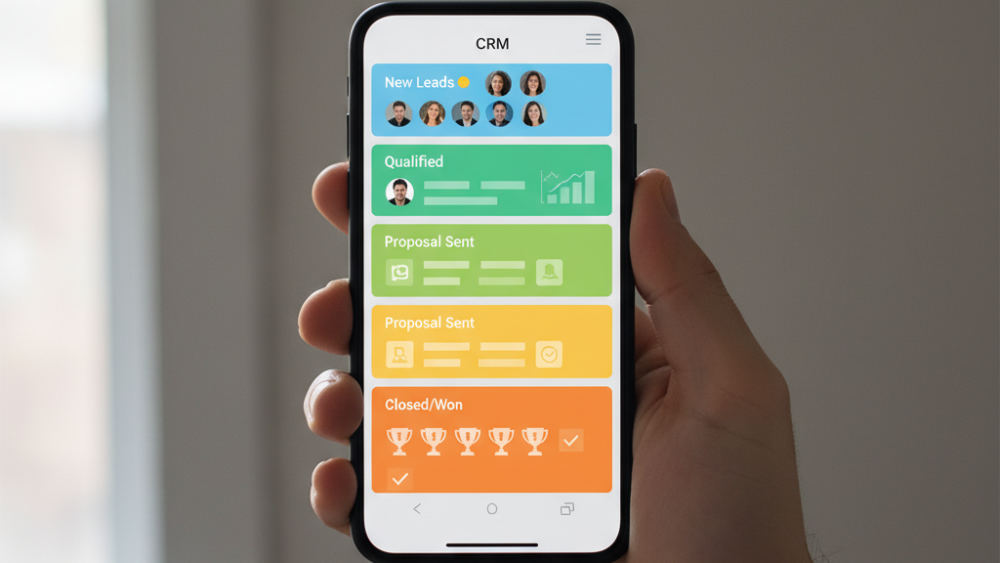
Lead management lets you capture prospects from web forms, email, and social channels, assign them to sales reps, and track progression through customizable stages.
Contact management organizes customer records with custom fields, tags, and linked notes, calls, and emails, providing a 360-degree view of each relationship. Sales forecasting uses historical pipeline data to predict revenue (accuracy depends on consistent data entry and clean deal stages).
Email marketing campaigns can be built inside Zoho CRM. The native tool is limited compared to dedicated email platforms. Many users connect Zoho Campaigns (a separate app) for advanced automation. AI features appear in higher-tier plans. Zia, Zoho's AI assistant, suggests next actions and predicts deal closure, but it doesn't handle phone calls, book appointments, or respond to leads in real time like Launch CRM's AI agent Rocket, which responds to leads in under 60 seconds.
Mobile apps for iOS and Android offer offline access and push notifications. You can update deals and log calls from the field. Workflow automation (available in Professional and above) triggers email sequences, task assignments, and field updates based on rules. Building complex multi-step automations often requires Zoho Flow (another separate app).
| Feature | Zoho CRM | Launch CRM |
|---|---|---|
| Lead capture and tracking | Yes (native) | Yes (native) |
| Email marketing | Limited (or separate Zoho Campaigns) | Full suite included |
| SMS marketing | Requires third-party or Zoho add-on | Native and unlimited |
| AI phone handling | No | Yes (Voice AI) |
| Real-time lead response | No | Yes (under 60 seconds) |
| Appointment booking | Manual or third-party | Automated by AI agent |
| Unified inbox (email, SMS, chat, social) | No | Yes |
The gap between what Zoho CRM offers natively and what most businesses actually need becomes clear when you try to automate lead follow-up or unify your customer communications. You'll either pay for additional Zoho apps or connect services like Twilio, Zapier, and third-party phone systems. Each one adds setup time, monthly fees, and potential failure points.
Zoho CRM Pricing and Plans
Zoho CRM offers a 15-day free trial for any paid plan and a permanent free edition for up to three users, making it easy to start without upfront investment.
Paid plans are billed per user per month: Standard at $14, Professional at $23, Enterprise at $35 (the most popular), and Ultimate at $52, all with annual billing. The free version includes basic lead and contact management but lacks workflow automation, custom reports, and advanced permissions. Most growing businesses need those features within months.
Enterprise at $35/user/month is where most teams land. It includes Zia AI, advanced customization, and multi-user portals. Add-ons like Zoho Campaigns, Zoho Desk, and Zoho SalesIQ push the real monthly cost higher. Unlike Launch CRM, which bundles CRM, email, SMS, phone, and AI into a single subscription, Zoho's suite approach means paying separately for each capability. Email automation, customer service, chat, and reputation management each require their own app and seat license.
Hidden cost: Zoho CRM's low per-user price looks attractive, but most businesses add Zoho Campaigns, Zoho Desk, and third-party phone tools within months, doubling the effective monthly spend.
When you compare pricing, count the total. A $35/user/month CRM becomes a $70+ per user commitment once you add the tools needed to actually run your marketing and customer service. Launch CRM's flat-rate approach includes everything: CRM, marketing automation, AI phone agent, web chat, reputation management, and sales funnels. You know exactly what you'll pay each month without surprise add-ons.
What Do Users Say About Zoho CRM?
Capterra reviewers meetergo Zoho CRM Review. Many note that initial configuration and customization need outside help or significant trial and error.
Positive feedback highlights the free tier, affordable scaling, and the depth of features available once the system is set up correctly. Teams that invest time in learning the platform often see strong ROI. Negative reviews center on three themes: functionality that doesn't work as advertised, difficulty reaching customer service for bug reports, and vague timelines for fixes and new features.
One Zoho Community user wrote after a year of use that Zoho Community Discussion. This sentiment echoes across third-party review sites. Users who succeed with Zoho CRM typically have dedicated admin time, a narrow use case (pure sales pipeline management), or an IT team to handle integrations and workarounds.
For businesses that need immediate lead response, integrated phone handling, or unified marketing without connecting multiple apps, user reviews consistently recommend looking at all-in-one alternatives. Ask whether the CRM vendor manages the entire customer journey (from the first form fill to appointment booking to post-sale review requests) or whether you'll need to assemble that workflow yourself across three or four different platforms.
Salesforce, another direct competitor, offers deep customization and a massive app marketplace but at a significantly higher price point and complexity level than Zoho. Most small businesses find both Zoho and Salesforce require either full-time admin resources or outside consultants to configure and maintain. All-in-one platforms are designed for business owners to manage themselves.
Zoho CRM vs. All-in-One Platforms: A Direct Comparison
Zoho CRM operates as part of a modular suite. Each tool (CRM, email, phone, support, social) is a separate product with its own login, billing, and admin panel. You need manual integration or Zoho Flow to connect them.
All-in-one platforms like Launch CRM combine customer management, email and SMS marketing, web chat, missed call text back, GMB messaging, social media DM management, sales funnel builder, and AI phone agents into a single login and unified contact record. When a lead fills out a form in Launch CRM, the system responds in under 60 seconds via AI agent (Rocket), logs the interaction in the CRM, and can book an appointment or send a follow-up sequence, all without switching apps or paying for additional seats.
Zoho requires Zoho CRM for pipeline management, Zoho Campaigns for email sequences, Zoho PhoneBridge or a third-party integration for calls, Zoho Desk for support tickets, and Zoho Social for social inbox. Each one is billed separately and managed independently. The table below shows the key operational differences for a 10-user team needing CRM, email marketing, phone, and AI features.
| Feature | Zoho CRM Suite | All-in-One Platform (Launch CRM) |
|---|---|---|
| Number of logins | 4-6 separate apps | 1 unified dashboard |
| Monthly cost (10 users) | $350+ CRM + $100+ Campaigns + $140+ Desk + phone provider | Single subscription includes all features |
| Lead response time | Manual (or add-on required) | AI responds in under 60 seconds 24/7 |
| Integration setup | Manual via Zoho Flow or Zapier | Native, no connectors needed |
| Support contacts | Separate teams per product | One support team for entire system |
| AI phone agent | Third-party only | Built in, answers and qualifies leads |
This difference matters when your sales process depends on speed. If a weekend lead waits until Monday morning for a human to respond, you lose deals to competitors whose AI answered immediately.
When Zoho CRM Falls Short: Limits and Risks
Businesses that rely on fast lead response (under five minutes) struggle with Zoho CRM because native automation cannot answer phone calls, qualify leads in real time, or book appointments without human intervention or third-party add-ons.
Setup complexity is a real barrier. Most small businesses lack the technical staff to configure custom modules, build workflows, and integrate external marketing tools. That leads to either a half-used system or consulting fees that erase the cost savings. Customer service frustrations reported in reviews create risk when your sales process depends on the CRM. If a feature breaks or data doesn't sync, slow support response directly impacts revenue.
Watch out: If functionality breaks or data doesn't sync in a multi-app suite, troubleshooting spans multiple support teams. All-in-one platforms offer one support contact for the entire customer journey.
Zoho's suite structure means you're managing multiple contracts, renewals, and user counts across apps. If one integration breaks (Zoho to third-party or between Zoho apps), troubleshooting spans multiple support teams. For businesses that need reputation management, review posting, or funnel-building, Zoho CRM provides no native tools. You must add Zoho Sites, Zoho Social, or external platforms, further complicating the stack.
All-in-one platforms eliminate these risks by owning the entire customer journey inside one system. Lead capture, response, nurture, close, and reputation management happen in a single database with one support contact. Launch Commerce offers Launch CRM as part of a broader business growth ecosystem, providing training and strategy support alongside the software itself.
How to Start Your CRM Journey in 2026
Define your must-have features first. Do you need just a sales pipeline? Or do you also need email campaigns, SMS follow-up, call handling, appointment booking, and review management?
If your list includes more than pure CRM, calculate the true cost of a suite approach (Zoho CRM plus add-ons) versus an all-in-one platform that bundles those capabilities at a flat rate. Test lead response speed during your trial. Send a test form submission at 8 p.m. and see what happens. Does a human have to reply, or does an AI agent answer immediately and book a time?
Practical rule: Test lead response speed during any CRM trial. Send a form at 8 p.m. and see if a human has to reply or if AI handles it instantly. Response time under five minutes dramatically improves conversion rates.
Map out your current tool stack (CRM, email provider, phone system, chat widget, review request tool) and ask whether consolidating into one platform would save time, reduce errors, and lower monthly spend. An all-in-one platform replaces the need for separate subscriptions to email software, SMS tools, chat apps, phone systems, and reputation managers. Everything lives in one contact record, with AI agents handling follow-up around the clock.
For a detailed breakdown of what Zoho CRM costs over time, including hidden fees and required add-ons, read our pricing analysis guide. Compare Zoho CRM against other platforms in our comprehensive comparison of customer relationship management systems to find the best fit for your industry and team size.
Prioritize vendors that offer live demo calls where you can test actual lead scenarios: form submission, missed call, after-hours inquiry. Watch how the system responds. A tool that automates those moments without your involvement is worth far more than one that simply stores contact information and requires you to manually follow up every lead.
Why Businesses Are Choosing All-in-One CRM and AI in 2026
Managing multiple tools creates data silos. When your CRM, email platform, phone system, and review app don't share a single contact record, leads fall through the cracks and follow-up is manual and slow.
Launch CRM's AI Employee Suite includes six specialized AI teammates: Conversation AI, Voice AI, Reviews AI, Content AI, Funnel AI, and Workflow AI. Each one handles tasks around the clock without human intervention. The AI Phone Agent answers calls, qualifies leads, books appointments directly into your calendar, and logs every conversation in the CRM. No lead goes unanswered, even after hours or during high call volume.
Integrated marketing means email, SMS, web chat, missed call text back, GMB messaging, and social media DMs all route to one inbox and trigger the same automated workflows. You get consistent follow-up across every channel. Sales funnel builder and management tools sit inside the CRM, so you can design landing pages, order forms, upsell sequences, and membership areas without connecting external funnel software or paying for separate hosting.
Reputation and review management features automate review requests after a purchase or appointment, post positive reviews to your website, and alert you to negative feedback so you can respond quickly. Everything logs against the customer's CRM record. This consolidation reduces monthly software costs, eliminates integration headaches, and gives every team member a single login to see the full customer journey from first click to repeat purchase.
Businesses in 2026 are prioritizing platforms that reduce complexity rather than add to it. Ask whether the vendor owns the entire stack (CRM, marketing, phone, AI, funnel builder) or whether they stitch together third-party services that may break or become unsupported over time.
Frequently asked questions
What are the main differences between Zoho CRM's free and paid editions?
The free edition supports up to three users and includes basic lead and contact management but lacks workflow automation, custom reports, and integration with other Zoho apps. Paid plans unlock automation rules, advanced permissions, API access, and Zia AI starting at the Professional tier ($23/user/month). Most growing businesses outgrow the free tier within a few months and need at least the Professional plan to automate follow-up and generate meaningful sales reports.
How does Zoho CRM compare to all-in-one CRM platforms for small businesses?
Zoho CRM is one app within a larger suite, requiring separate subscriptions for email automation (Zoho Campaigns), customer support (Zoho Desk), and phone systems (third-party or Zoho PhoneBridge). All-in-one platforms bundle CRM, email, SMS, phone, chat, and AI into a single subscription with unified contact records and one admin panel. For small businesses without dedicated IT staff, an all-in-one system reduces setup time, eliminates integration troubleshooting, and provides faster, simpler support.
What are the common challenges users face when setting up Zoho CRM?
Customizing modules, fields, and workflows requires technical knowledge or outside consulting. Many users report a steep learning curve. Connecting Zoho CRM to email, phone, and marketing tools often involves third-party apps or Zoho Flow, adding complexity and potential failure points. Users frequently mention needing weeks or months to configure the system properly, during which leads may be mishandled or lost.
Does Zoho CRM effectively integrate with other business tools?
Zoho CRM integrates with other Zoho apps and popular third-party tools via API, Zapier, or Zoho Flow, but each integration requires setup, testing, and ongoing maintenance. Native integrations within the Zoho suite are stronger than external ones, which can break or require re-authorization after updates. All-in-one platforms avoid integration issues entirely by building every feature natively inside one system so data flows automatically without connectors.
What is the actual long-term cost of using Zoho CRM, including potential add-ons or setup help?
While Zoho CRM's Enterprise plan lists at $35/user/month, adding Zoho Campaigns ($10+/month), Zoho Desk ($14+/user/month), and implementation consulting ($1,000–$5,000) can double or triple the effective monthly spend. Many businesses also pay for Zapier or Zoho Flow to connect non-Zoho tools, plus third-party phone systems and reputation management apps. All-in-one platforms typically charge a flat monthly rate per user that includes CRM, marketing, phone, and AI, making budgeting simpler and often cheaper over 12 months.
What are the alternatives to Zoho CRM for businesses needing comprehensive marketing and AI features?
Salesforce offers deep customization and a massive app marketplace but at a significantly higher price point and complexity level. All-in-one platforms provide CRM, email, SMS, web chat, AI phone agents, funnel builders, and reputation management in one subscription (ideal for small to mid-sized businesses). HubSpot CRM is free with marketing add-ons, but scaling up requires expensive Marketing Hub and Sales Hub subscriptions, similar to Zoho's multi-app model.
How can I manage all my business tools in one platform?
A unified platform consolidates customer relationship management, email and SMS marketing, web chat, missed call text back, GMB messaging, social media DM management, sales funnels, and AI phone agents into a single login. Every customer interaction (form submission, phone call, chat message, email reply) is logged automatically in one unified contact record, eliminating the need to switch between apps or manually sync data. This approach replaces an average of 6–10 separate software subscriptions, reducing monthly costs and eliminating integration headaches.
How can I improve my lead response time?
An AI agent responds to new leads in under 60 seconds via email, SMS, or phone, even outside business hours. No prospect waits for a callback. The AI qualifies leads by asking scripted questions, books appointments directly into your calendar, and logs the conversation in the CRM so your sales team sees the full context before the meeting. Automated follow-up sequences continue nurturing leads who don't book immediately, keeping your business top-of-mind without manual effort.
Ready to consolidate your business tools and respond to every lead in under 60 seconds? Call us at (760) 253-1477 to discuss how an all-in-one CRM and AI platform can replace your current stack, eliminate integration headaches, and help you close more deals without adding staff or complexity to your operations.